VGA → USB-C: The History of Laptop Display Connections
If you have used laptops for long enough, you have probably watched the display connector change several times.
First there was VGA.
Then came DVI.
HDMI became common.
DisplayPort appeared in computers and monitors.
Mini DisplayPort made high-speed digital display connections easier to fit into thin laptops.
And eventually, a small USB-C connector started doing the work of several older ports at once.
That progression can look like a simple sequence of connector replacements.
It wasn’t.
Each generation changed not only the connector, but also how video was represented, transported and shared with other kinds of data.
Understanding that history makes modern laptop specifications much easier to read. A USB-C port is not simply a smaller VGA, HDMI or DisplayPort connector. It is a physical interface that can carry different protocols depending on how the laptop implements it.
So the useful question is not:
“Which connector replaced VGA?”
It is:
“How did laptop display connections evolve from dedicated video outputs into flexible, multi-protocol interfaces?”
The short version
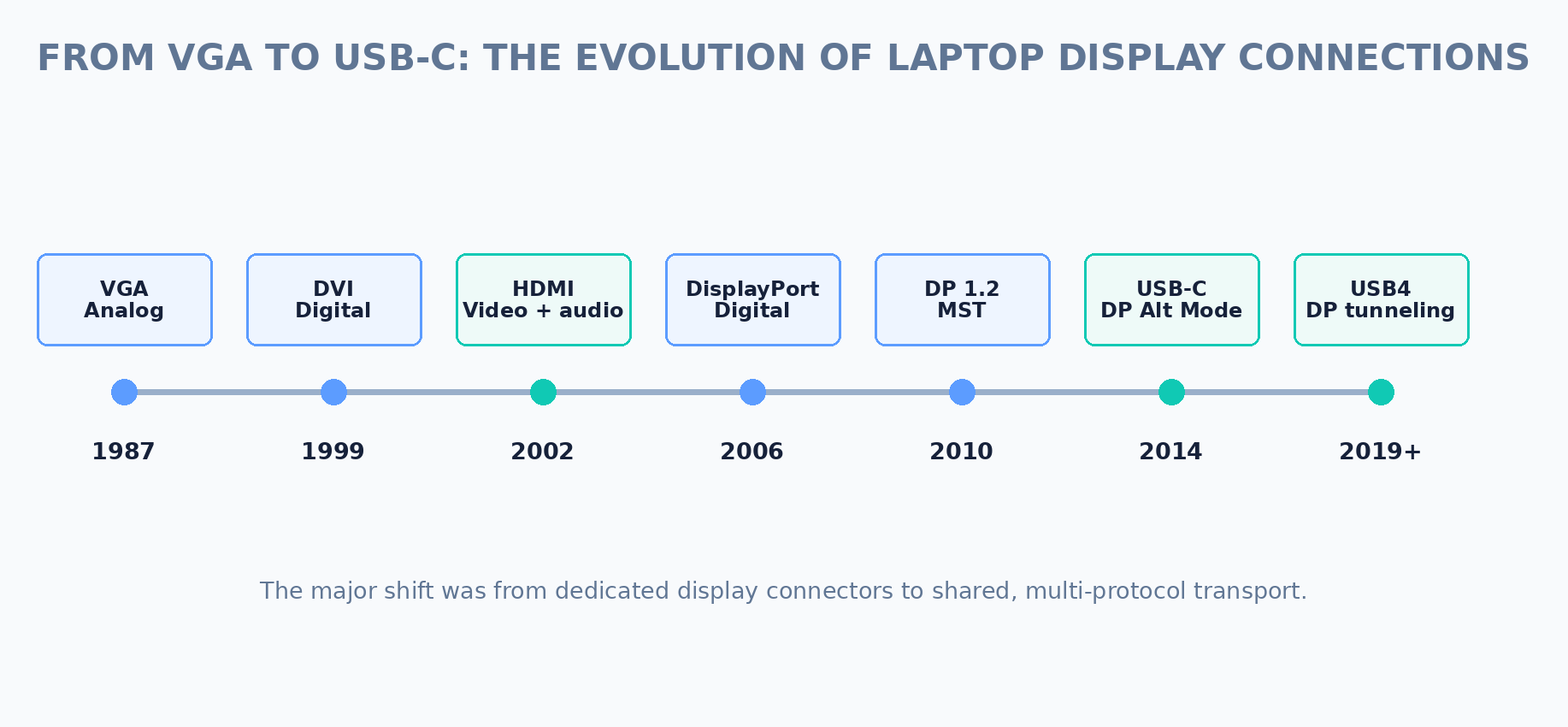
The broad progression looks like this:
|
Era |
Common interface |
What changed |
|---|---|---|
|
1980s–1990s |
VGA |
Analog RGB became the familiar PC-to-monitor connection. |
|
Late 1990s–2000s |
DVI |
Digital display links became practical for flat-panel displays, while some DVI variants retained analog compatibility. |
|
2000s–2010s |
HDMI |
Digital video and audio were combined in a compact connector, especially for consumer electronics and laptops. |
|
2006 onward |
DisplayPort |
A flexible digital computer-display interface emerged with higher bandwidth and multi-stream support. |
|
2010s |
Mini DisplayPort |
The DisplayPort connector became small enough for thin laptops and other compact systems. |
|
2014 onward |
USB-C + DisplayPort Alt Mode |
DisplayPort could travel through the USB Type-C interface, allowing one connector to handle display and other functions. |
|
2019 onward |
USB4 / Thunderbolt over USB-C |
USB-C became a transport for multiple protocols, including DisplayPort, USB data and other traffic in applicable systems. |
The important theme is convergence.
Older laptop designs tended to give display a dedicated connector. Modern designs increasingly use a common connector and let the system decide which protocol travels through it.
VGA: when the computer sent an analog picture
VGA — Video Graphics Array — dates to IBM’s Personal System/2 systems introduced in 1987.
The original VGA system was a graphics standard as well as a display interface. Its familiar 15-pin connector became the standard-looking PC monitor connection for decades.
The key characteristic was simple:
The computer generated an analog video signal, and the monitor received that analog signal.
For a CRT display, that made sense.
A graphics adapter generated continuously varying red, green and blue signals. The monitor’s electronics used those signals to control the display.
For many years, that was simply how a PC connected to a monitor.
IBM’s PS/2 architecture helped establish VGA as a widely recognized PC graphics standard. IBM PS/2 history
Why VGA eventually became a problem
The problem was not that VGA suddenly stopped working.
The problem was that displays changed.
CRT monitors were gradually joined — and then largely replaced — by flat-panel LCD displays.
An LCD panel is fundamentally digital. If the computer’s graphics hardware already has a digital representation of the image, sending that image through an analog conversion step and then converting it back to digital inside an LCD monitor is an unnecessary detour.
That does not mean VGA was automatically poor quality. A good VGA connection could produce a very good image.
But the interface no longer matched the internal architecture of the dominant display technology.
That created pressure for digital display interfaces.
DVI: the transition to digital display
The Digital Visual Interface (DVI) emerged in 1999 from the Digital Display Working Group (DDWG).
The DVI 1.0 specification was released on April 2, 1999. The standard used TMDS technology for digital video transmission and was designed to connect computers with digital displays. DVI: A Standard for the Digital Monitor Interface
DVI was important because it could carry the computer’s video digitally to the display.
That removed the analog conversion step required by VGA for a digital flat panel.
DVI was not just one thing
DVI included several connector variants:
|
DVI type |
Digital video |
Analog video |
|---|---|---|
|
DVI-D |
Yes |
No |
|
DVI-A |
No |
Yes |
|
DVI-I |
Yes |
Yes |
This was useful during the transition period because some DVI implementations could bridge older analog equipment and newer digital displays.
DVI also came in single-link and dual-link forms, with dual-link providing additional bandwidth.
Why DVI did not become the final laptop connector
DVI solved the digital-video problem, but the connector was physically large.
That was less of a concern on desktop graphics cards than on thin laptops.
At the same time, consumer electronics manufacturers wanted an interface that could carry both video and audio conveniently.
That helped create the conditions for the next generation.
HDMI: digital video meets consumer electronics
HDMI 1.0 was released in December 2002.
The original HDMI design combined uncompressed digital high-definition video with multi-channel audio in a single cable. It also built on DVI technology while adding features aimed at consumer electronics. Toshiba announcement of HDMI 1.0
That combination was extremely useful.
A television could receive:
video + audio
through one compact connection.
For laptops, HDMI offered another important advantage: a relatively small connector with a straightforward digital display connection.
It became common on laptops during the 2000s and remained common even after newer interfaces appeared.
HDMI was especially strong in the living room
HDMI’s history is closely tied to TVs, Blu-ray players, game consoles, receivers and other consumer electronics.
DisplayPort, by contrast, was designed primarily around computer and display applications.
That distinction still matters today.
If you are connecting a laptop directly to a television, HDMI is often the obvious interface.
If you are building a multi-monitor computer setup, DisplayPort and USB-C-based DisplayPort transport can become more important.
Neither is inherently “better” in every situation. They evolved around somewhat different priorities.
DisplayPort: a new approach for computer displays
VESA released the first DisplayPort standard in 2006.
DisplayPort was designed as a modern digital display interface with a scalable high-speed link and support for multiple displays from a single connection.
VESA’s published history lists DisplayPort 1.0 in Q2 2006, followed by major increases in capability in later versions. DisplayPort 1.2, for example, introduced multi-stream transport and substantially increased available link capacity. VESA DisplayPort technology history
DisplayPort also became important because it was designed to evolve.
Later generations added:
- higher link rates;
- multiple display streams;
- adaptive synchronization features;
- higher-resolution support;
- and Display Stream Compression (DSC) for demanding display modes.
VESA introduced its first Display Stream Compression standard in 2014, and DSC was subsequently incorporated into DisplayPort and other display interfaces. VESA Display Stream Compression
Mini DisplayPort: the connector gets smaller
The DisplayPort protocol did not require the full-size DisplayPort connector.
A smaller physical connector — Mini DisplayPort — became particularly useful in laptops.
This demonstrated a distinction that is still important today:
The physical connector and the display protocol are not necessarily the same thing.
Mini DisplayPort could carry DisplayPort.
The connector was simply smaller.
That made it easier to put a high-performance digital display interface into a thin laptop without dedicating as much physical space to the port.
Then USB-C changed the equation
USB Type-C arrived as a new physical connector designed to support a broad range of USB capabilities.
But the really important development for displays was not the shape of the connector.
It was the ability to use DisplayPort through USB-C.
VESA released the first DisplayPort Alt Mode standard for USB-C on September 22, 2014. The standard enabled the USB Type-C interface to carry DisplayPort. VESA DisplayPort over USB-C
This was a major conceptual change.
Before USB-C, you could generally look at a laptop and think:
- VGA = display
- HDMI = display
- DisplayPort = display
- USB = data
With USB-C, that simple classification stopped working.
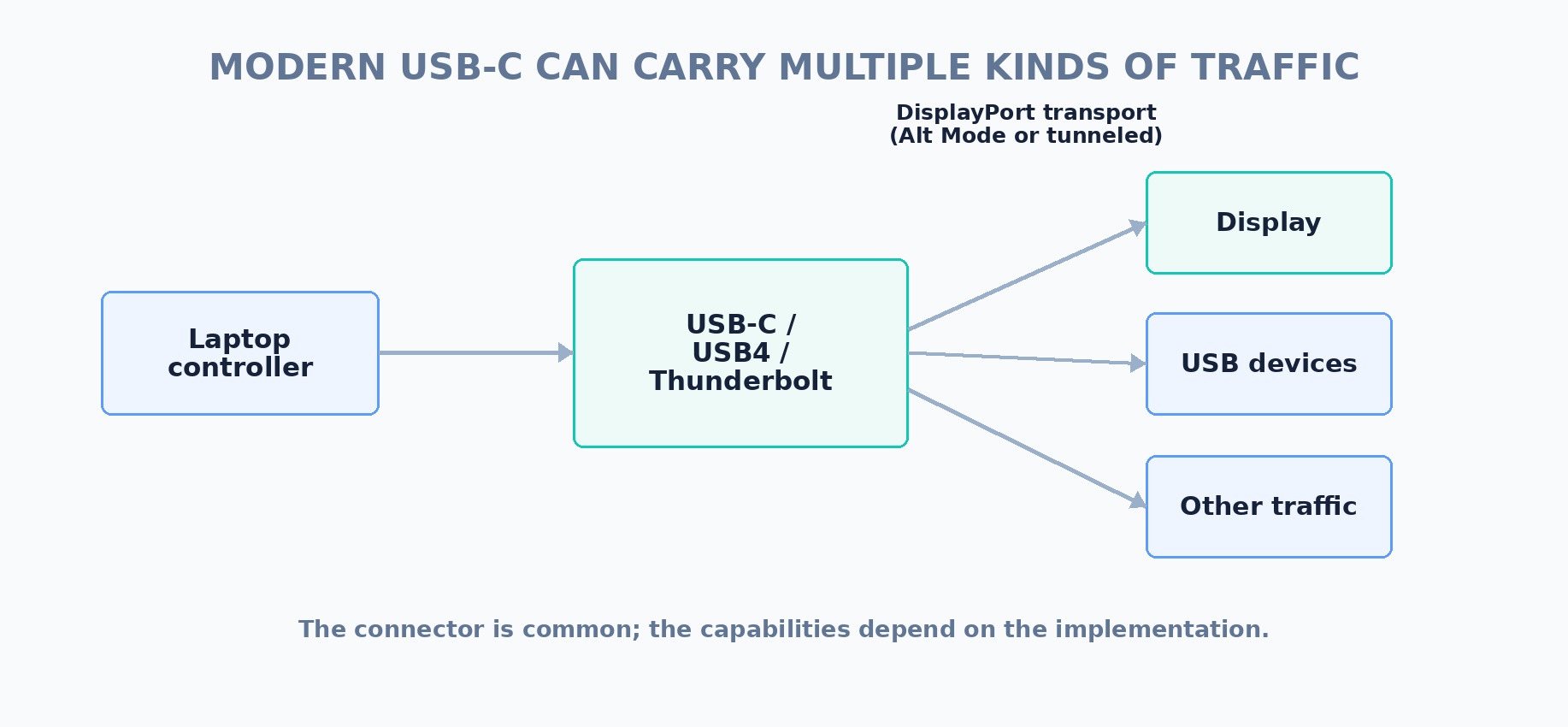
A USB-C connector might carry:
- USB data;
- DisplayPort;
- USB Power Delivery;
- or, on compatible systems, USB4 or Thunderbolt traffic.
The connector alone no longer tells you what the port can do.
USB-C is a connector, not a guarantee of video
This is probably the most important lesson from the entire history.
A USB-C port is a physical interface.
It does not automatically mean:
“This port supports video.”
The laptop has to implement a display-capable mode.
For example, a USB-C port may support DisplayPort Alt Mode, while another USB-C port on the same laptop may have different capabilities.
That is why laptop specifications increasingly need to describe USB-C ports in terms of their supported functions rather than simply counting connectors.
DisplayPort Alt Mode was a bridge between two worlds
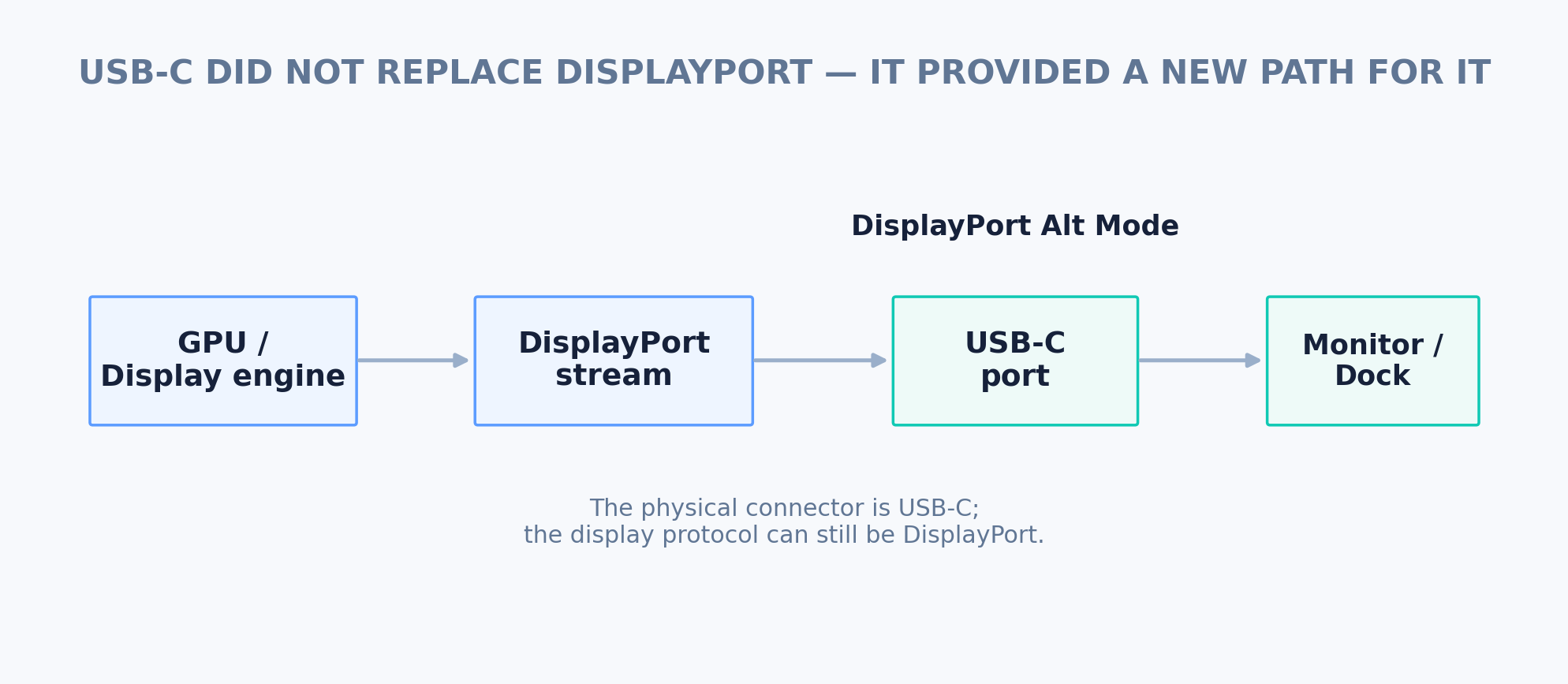
DisplayPort Alt Mode did not replace DisplayPort.
It allowed DisplayPort to travel through the USB-C physical interface.
Conceptually:
DisplayPort source → USB-C connector → DisplayPort-capable display or dock
The USB-C connector became the physical transport point, while DisplayPort remained the display protocol.
That explains why a USB-C-to-DisplayPort cable can work without requiring a USB graphics adapter: the laptop may already be generating a native DisplayPort stream.
Two-lane versus four-lane USB-C display connections
USB-C added another layer of complexity.
Depending on the implementation, the high-speed lanes can be allocated differently between DisplayPort and USB data.
A system can therefore have enough USB-C capability for display output while still retaining USB data, or devote more of the available high-speed lanes to DisplayPort.
That means two USB-C ports can have different display capabilities even if their connectors look identical.
This is one reason specifications such as:
USB-C with DisplayPort
are much more useful than:
2 × USB-C
The exact capabilities still depend on the laptop’s implementation.
Thunderbolt and USB4 made USB-C a transport fabric
Thunderbolt 3 adopted the USB-C connector and could carry DisplayPort alongside other protocols.
USB4 later formalized a multi-protocol architecture in which DisplayPort can be tunneled through the USB4 fabric.
USB-IF’s USB4 system overview explicitly describes DisplayPort protocol tunneling through the USB4 fabric, with adapters packaging and unpacking DisplayPort streams at the ends. USB-IF USB4 System Overview
This is a major conceptual difference from VGA.
The modern laptop does not necessarily have a dedicated physical video wire running from the connector to the display.
Instead, a high-speed interconnect can carry different kinds of traffic, including display traffic, and the system routes that traffic to the appropriate device.
The connector became less informative
This is perhaps the biggest historical change.
With VGA, the connector told you almost everything important.
With DVI, the connector gave you a good idea of the video transport, although the DVI variant still mattered.
With HDMI and DisplayPort, the connector and protocol were still closely associated.
With USB-C, that relationship became much weaker.
A USB-C port might support:
|
Port implementation |
Possible display capability |
What else it may carry |
|---|---|---|
|
USB data only |
No native display output |
USB data |
|
DisplayPort Alt Mode |
Native DisplayPort video |
USB data and power, depending on lane allocation and implementation |
|
USB4 |
DisplayPort tunneling |
USB and other tunneled protocols |
|
Thunderbolt |
DisplayPort transport |
Other high-speed tunneled traffic and USB |
The same physical connector can therefore represent very different capabilities.
That is why USB-C port specifications matter more than USB-C port counts.
The physical connector is only one layer
It helps to think about modern display connections as several layers.
|
Layer |
Examples |
What it tells you |
|---|---|---|
|
Physical connector |
VGA, HDMI, DisplayPort, USB-C |
What you can physically plug into the device. |
|
Display protocol |
Analog VGA, TMDS/DVI/HDMI, DisplayPort |
How display information is represented and transported. |
|
Transport architecture |
MST, USB4 tunneling, Thunderbolt |
How one connection can carry or distribute one or more streams. |
|
Physical link capability |
Lane count, link rate, bandwidth |
How much information can actually travel through the connection. |
|
System topology |
GPU, display engine, MUX, dock |
Which hardware is actually generating and routing the display output. |
This layered model is much more useful than thinking of a port as simply “a video port.”
Why adapters are not all the same
The history also explains why two adapters that appear to solve the same problem can behave very differently.
Consider:
USB-C → DisplayPort
versus:
USB → HDMI graphics adapter
They may both end with a monitor.
But internally they can be doing completely different things.
A USB-C-to-DisplayPort adapter can simply expose a native DisplayPort stream that the laptop already generated.
A USB graphics adapter can instead receive display data over USB and use its own display hardware to generate the external video output.
That difference affects:
- performance;
- latency;
- driver requirements;
- maximum display modes;
- and suitability for demanding workloads.
So “adapter” is not a sufficiently precise technical description.
Why old ports still appear on some laptops
The disappearance of VGA and DVI was not instantaneous.
Businesses, schools, meeting rooms and industrial systems often kept older displays in service for years.
That created a long transition period in which laptops might include combinations such as:
- VGA + HDMI;
- VGA + DisplayPort;
- HDMI + Mini DisplayPort;
- or USB-C alongside one or more legacy video outputs.
This was often an attempt to maintain compatibility with an enormous installed base of monitors and projectors.
The same reason explains why VGA adapters remained useful long after new laptops had stopped including VGA connectors.
Why VGA-to-USB-C is not a simple “conversion”
Suppose you have an old VGA projector and a modern USB-C laptop.
It is tempting to think:
USB-C is newer than VGA, so I just need a USB-C-to-VGA cable.
Sometimes that works — but the mechanism matters.
If the USB-C port provides native DisplayPort output, a USB-C-to-VGA adapter generally needs active electronics to convert the digital display signal into analog VGA.
It is not simply changing the connector shape.
The direction matters too.
A passive cable cannot magically turn a digital DisplayPort signal into analog VGA.
The adapter has to perform the appropriate signal conversion.
This is very different from a USB-C-to-DisplayPort cable, where the laptop may already be producing DisplayPort and the cable is primarily adapting the physical connection.
A useful rule when buying adapters
Ask:
Is this adapter changing the connector, or changing the signal?
Those are different jobs.
|
Adapter type |
Typical job |
What to check |
|---|---|---|
|
USB-C → DisplayPort |
Expose native DisplayPort from a display-capable USB-C port |
Whether the USB-C port supports DisplayPort Alt Mode or an appropriate USB4/Thunderbolt display path. |
|
USB-C → HDMI |
Adapt or convert a native digital display path to HDMI |
Supported HDMI version, resolution/refresh limits and adapter architecture. |
|
USB-C → VGA |
Convert a digital display signal to analog VGA |
Active conversion, supported resolutions and compatibility with the target display/projector. |
|
USB → HDMI/DisplayPort |
Use a USB graphics/display system to create an additional display output |
Driver support, performance, maximum displays and workload suitability. |
The real reason USB-C won
USB-C did not become important because it was simply “the best video connector.”
USB-C is not fundamentally a video connector at all.
Its strength is that it provides a compact, reversible physical interface that can support a wide range of capabilities.
A single USB-C port can potentially handle:
power + USB data + display + high-speed protocol tunneling
That is extremely valuable on a laptop where physical space is limited.
Instead of providing separate connectors for every function, manufacturers can expose several functions through a small number of USB-C ports.
But convergence created a new problem
The old problem was:
There are too many different connectors.
The new problem is:
The same connector can mean too many different things.
That is why modern laptop specifications can be surprisingly difficult to interpret.
A laptop with:
3 × USB-C
could have three ports with different display capabilities.
One might support Thunderbolt.
Another might support USB4.
Another might provide USB data only.
Or all three might support DisplayPort but with different lane allocations or system-level limitations.
The connector count alone tells you almost nothing.
What this means when buying a laptop
If you are comparing laptops today, the useful question is no longer:
“Does it have a video port?”
Instead ask:
- Which ports can carry native display output?
- Which display protocol do they use?
- How many display streams can the system generate?
- How much bandwidth is available?
- Can the ports share lanes with USB data?
- Does USB4 or Thunderbolt tunnel DisplayPort?
- Which GPU or display engine actually drives the port?
- What happens when a dock is connected?
- What display modes are supported simultaneously?
These questions are much closer to the information you actually need when choosing a laptop.
The big lesson from VGA to USB-C
The history of laptop display connections is not really a story about one connector replacing another.
It is a story about abstraction.
VGA exposed a dedicated analog video connection.
DVI moved computer displays toward direct digital transmission.
HDMI combined digital video and audio in a compact consumer interface.
DisplayPort introduced a flexible high-speed computer-display transport with multi-stream capabilities.
Mini DisplayPort made that technology practical for thinner devices.
USB-C then separated the physical connector from the transport protocol, allowing DisplayPort and other high-speed protocols to travel through the same compact interface.
And USB4 and Thunderbolt pushed that idea further by treating the connection as a multi-protocol transport.
That is why the modern USB-C port is simultaneously simpler and more complicated than the VGA port it replaced.
The connector is simpler. The system behind it is not.
And that is exactly why, when comparing modern laptops, the number of ports is no longer enough. You need to know what those ports actually carry.